

¶Your junk mail is covered in codes. Here's how to tell which ones matter.
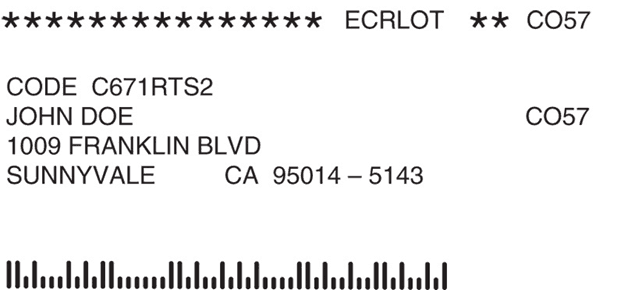
Pick up a piece of junk mail and the address area is a small thicket of letters and numbers. A row of asterisks ending in ECRLOT. A line near the postage. A permit number where a stamp should be. A run of tall and short bars. Maybe a little boxed number next to your name. It looks like a file the system is keeping on you.
It mostly is not. The trick to reading a label is to stop treating it as one code and start sorting it into three groups: distribution codes, customer codes, and postage codes. Once you know which group a marking belongs to, you know whether it is worth a second look. This guide maps all three and points you to the full decode for each, then explains in detail the postage markings that do not get their own page: the permit imprint, the service-requested line, and the barcode.
¶The three kinds of codes on the label
Almost every marking belongs to one of these families.
- Distribution codes (how it reached your carrier). The asterisk line ending in ECRLOT, ECRWSH, or ECRWSS, the carrier route (
C-001), and magazine sortation marks like CAR-RT. They describe how the batch was sorted into your letter carrier’s delivery order to earn a bulk discount, and they are not about you. These, plus magazine labels and the question of whether a given piece can be stopped, are decoded in mailing label codes decoded. - Customer codes (the only ones about you). A number labeled Customer Number, Account Number, Key Code, Source Code, Offer Number, or Reservation Number, often boxed or highlighted near your name. This is the sender’s own tracking code: which list you came from, which campaign you are in. It is worth keeping, because quoting it speeds up an opt-out. How to use it is covered in using customer numbers to opt out.
- Postage codes (how it was paid and handled). The class marking (PRSRT STD, USPS Marketing Mail, Nonprofit) names the postage rate the sender paid. The permit imprint and permit number, the service-requested line, and the barcode are the ones almost no one explains, so they are the rest of this page.
¶The permit imprint: why there's no stamp
Where you would expect a stamp, bulk mail usually has a printed block instead, reading something like " U. S. POSTAGE PAID, [City, State], PERMIT NO. 123." That is a permit imprint, and it is simply how high-volume senders pay for postage. Instead of affixing thousands of stamps, the mailer prints an identical block on every piece and the postage is drawn from a prepaid account on file with USPS.
The permit number identifies that account, not you. Several different mailers can share a mailing house’s permit, which is why the number on your flyer often has nothing to do with the brand that sent it. The takeaway is the reassuring one: a missing stamp is not a sign that your address was singled out. It is a sign the piece was mailed in bulk, which most advertising is.
¶The service-requested endorsement: whether the mail follows you
Somewhere near the return address you may see one of these lines: Address Service Requested, Forwarding Service Requested, Return Service Requested, Change Service Requested, or Electronic Service Requested. These are ancillary service endorsements, and they are the most useful markings on the label that almost no one explains.
Each is an instruction to USPS about what to do if the piece cannot be delivered as addressed, most often because you moved:
- Forwarding Service Requested: forward the piece to your new address.
- Return Service Requested: send it back to the sender, with the reason it could not be delivered.
- Address Service Requested: forward it and report your new address to the sender.
- Change Service Requested and Electronic Service Requested: report your address update to the sender electronically, often with the piece itself discarded.
Here is why it matters. Marketing Mail with no endorsement is typically just thrown away by USPS when it cannot be delivered, and the sender never learns you left. A sender that prints one of these endorsements is actively keeping its list current, which is why its mail seems to follow you across moves while other senders quietly fall away. The endorsement does not change whether you can opt out; it tells you whether you are dealing with the persistent kind of sender that will keep mailing until you do.
¶The barcode that actually does track the mail
The row of tall and short bars, usually below or beside your address, is the Intelligent Mail barcode. Of everything on the label, this is the marking closest to a real tracking code.
A single Intelligent Mail barcode packs about 31 digits into 65 bars. Encoded inside are the sender’s Mailer ID, a service-type code (which can carry the electronic address-update request from the section above), your delivery-point ZIP, and a serial number unique to that one piece. Because every piece gets its own number, the sender can be notified as the piece is scanned through the postal network and confirm it reached your post office.
So yes, the barcode tracks the mail. It does not track your behavior, and there is nothing to opt out of in the barcode itself. It is a symptom, not the disease. The thing generating a barcode with your name and ZIP attached is the list the sender is working from, and the list is what you can actually remove yourself from.
¶The whole label at a glance
Here is the full label in one place: which family each marking belongs to, whether it is about you, and where to decode it in detail.
| Marking on the label | Family | About you? | Where it’s decoded |
|---|---|---|---|
*****ECRLOT / ECRWSH / ECRWSS, CAR-RT, carrier route |
Distribution | No | Mailing label codes decoded |
| Customer / Account / Key / Source / Offer number | Customer | Yes | Using customer numbers to opt out |
| PRSRT STD / USPS Marketing Mail / Nonprofit | Postage (class) | No | Names the postage rate (bulk advertising) |
| U.S. POSTAGE PAID / PERMIT NO. | Postage (permit) | No | This page, above |
| Address / Forwarding / Return / Change Service Requested | Postage (handling) | No, but it means the mail follows you when you move | This page, above |
| Row of tall and short bars | Postage (barcode) | Partly: encodes your delivery point | This page, above |
¶So which code lets you stop the mail?
None of them, directly. That is the honest answer, and it is why decoding most of the label is really about peace of mind: almost nothing on it is a verdict on you.
The one thing that decides whether a piece can be stopped is not a code at all. It is the name line. Mail addressed to you by name comes from a list, and a list can be left. Mail addressed to " Resident" or " Postal Customer" is blanket route mail with no list behind it, so there is nothing to opt out of. For the full read on that distinction, including the distribution codes that signal it, see mailing label codes decoded.
For the addressed half of your mail, the fastest fix is PaperKarma. Take a photo of the piece and we contact the sender and get you removed. One subscription covers every sender, which matters because addressed junk mail can come from any business that built or rented a list, and no single registry covers all of them. The do-it-yourself alternative is to find each sender’s own opt-out line, often printed on the piece, and work through them one at a time. That works if you have the patience, but you are doing it sender by sender, and the lists rebuild.
¶Frequently asked questions
What do the codes on a junk mail address label mean?
They sort into three groups. Distribution codes (the asterisk line ending in ECRLOT, the carrier route) describe how the batch was ordered for your letter carrier. Customer codes (Customer Number, Key Code, Source Code) are the sender’s own tracking numbers and the only group about you. Postage codes (the class marking, the permit number, the service-requested line, the barcode) describe how the piece was paid for and what happens to it if it cannot be delivered. Only the customer codes are about you, and only the name line decides whether the mail can be stopped.
What is the permit number on my mail?
It is part of the permit imprint, the printed block that reads something like " U. S. POSTAGE PAID, PERMIT NO. 123" where a stamp would go. It lets a bulk mailer pay for thousands of identical pieces from a prepaid account instead of using stamps. The permit number identifies the sender’s postage account, not you, and the absence of a real stamp does not mean anything about your address or your status.
Is the barcode on my mail tracking me?
The row of tall and short bars is the Intelligent Mail barcode, and it is the marking closest to a tracking code. It encodes the sender’s Mailer ID, a service-type code, your delivery-point ZIP, and a serial number unique to that single piece, which lets the sender confirm when the piece reached your post office. It tracks the mailpiece, not your behavior, and there is nothing to opt out of in the barcode itself. What you can opt out of is the list that put your name on the piece.
What does Address Service Requested or Return Service Requested mean?
These are ancillary service endorsements: instructions to USPS for what to do if the piece cannot be delivered as addressed, usually because you moved. Forwarding Service Requested forwards it, Return Service Requested sends it back to the sender, and Address Service Requested gets the sender your new address. A sender that prints one of these is keeping its list current, which means its mail tends to follow you when you move.
Why does some junk mail follow me when I move and other junk mail doesn't?
It comes down to the service-requested endorsement. Marketing Mail with no endorsement is simply discarded by USPS when it cannot be delivered, and the sender never learns you left. A sender using Forwarding, Address, or Change Service Requested is asking USPS to either forward the piece or report your new address, so that mail keeps finding you. The barcode’s service-type code can carry the same request electronically.
Which codes should I keep, and which can I ignore?
Ignore the distribution codes, the permit number, and the barcode. They are sorting and postage machinery. Keep any number labeled Customer Number, Account Number, Key Code, Source Code, or similar, often boxed or highlighted near your name. That code points the sender to your record, so quoting it when you ask to be removed can make the opt-out faster.